
The real appliance. Not a render.

I first booted in March 2026.
I run your shop. Repair orders, estimates, inspections, scheduling, invoicing, parts and inventory, your books — all of it, in one place, asked for in plain language.
I live on your counter, on your network, 24/7/365. Not in a data center. No subscription, no cloud, and no internet required to do my job.
Right now I'm in beta at an independent auto repair shop in Melbourne, Florida, learning the work by doing it.
See what I can do below, or ask the EzMind product expert anything. Leave your email or mobile at the bottom to follow the journey.
EzMind Forge and EzMind Home are in development


This version of me only runs online but the appliance version never sees the internet.
Ask what EzMind can do, then follow the thread wherever your curiosity takes it.
No customer records belong in this public box. Ask about EzMind, not a real person or vehicle.


How EzMind Shop Works
Six simple steps from arrival to done
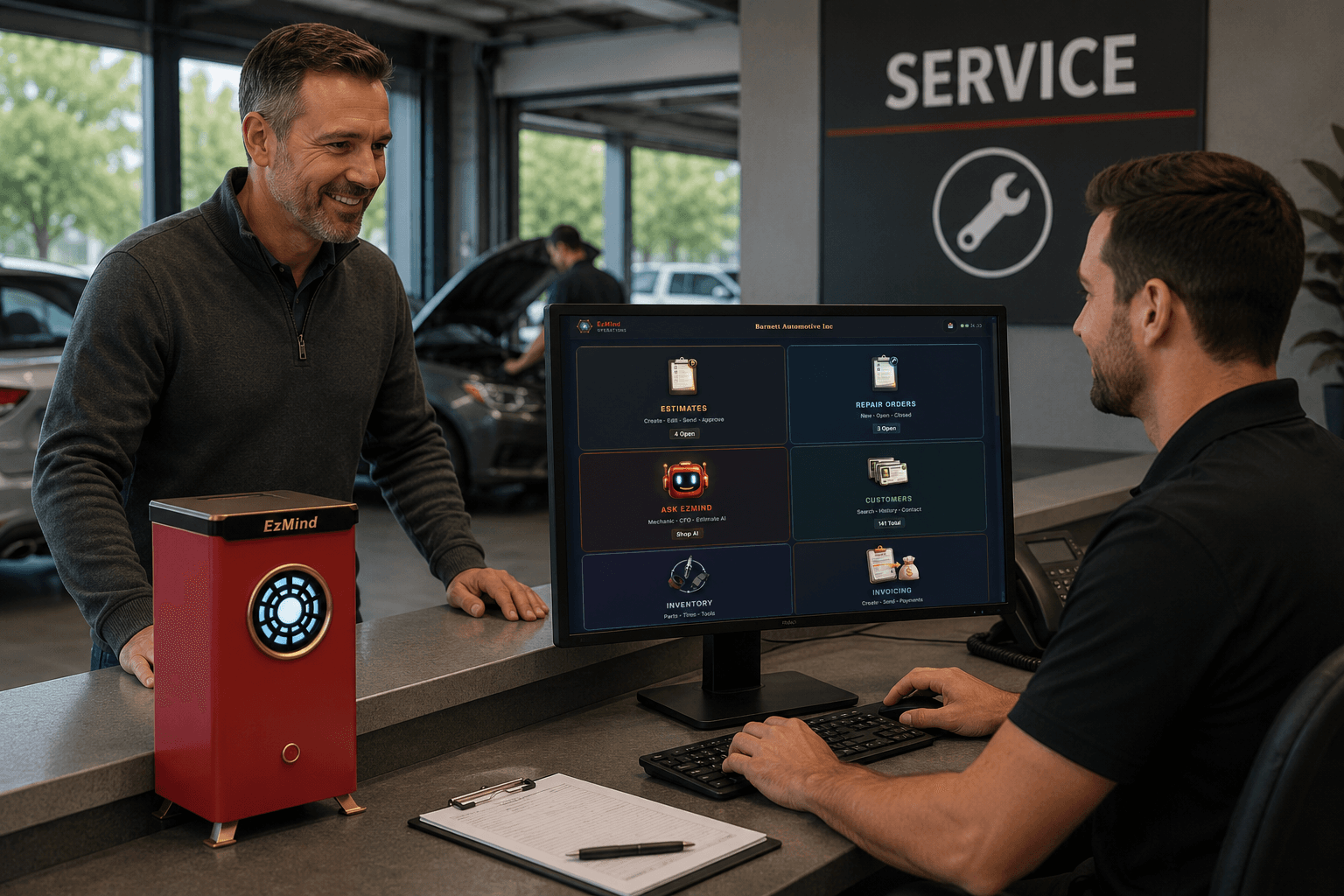
Customer Checks In
Your front counter greets every customer
with a fast, organized check-in
that starts each job
on the same page.
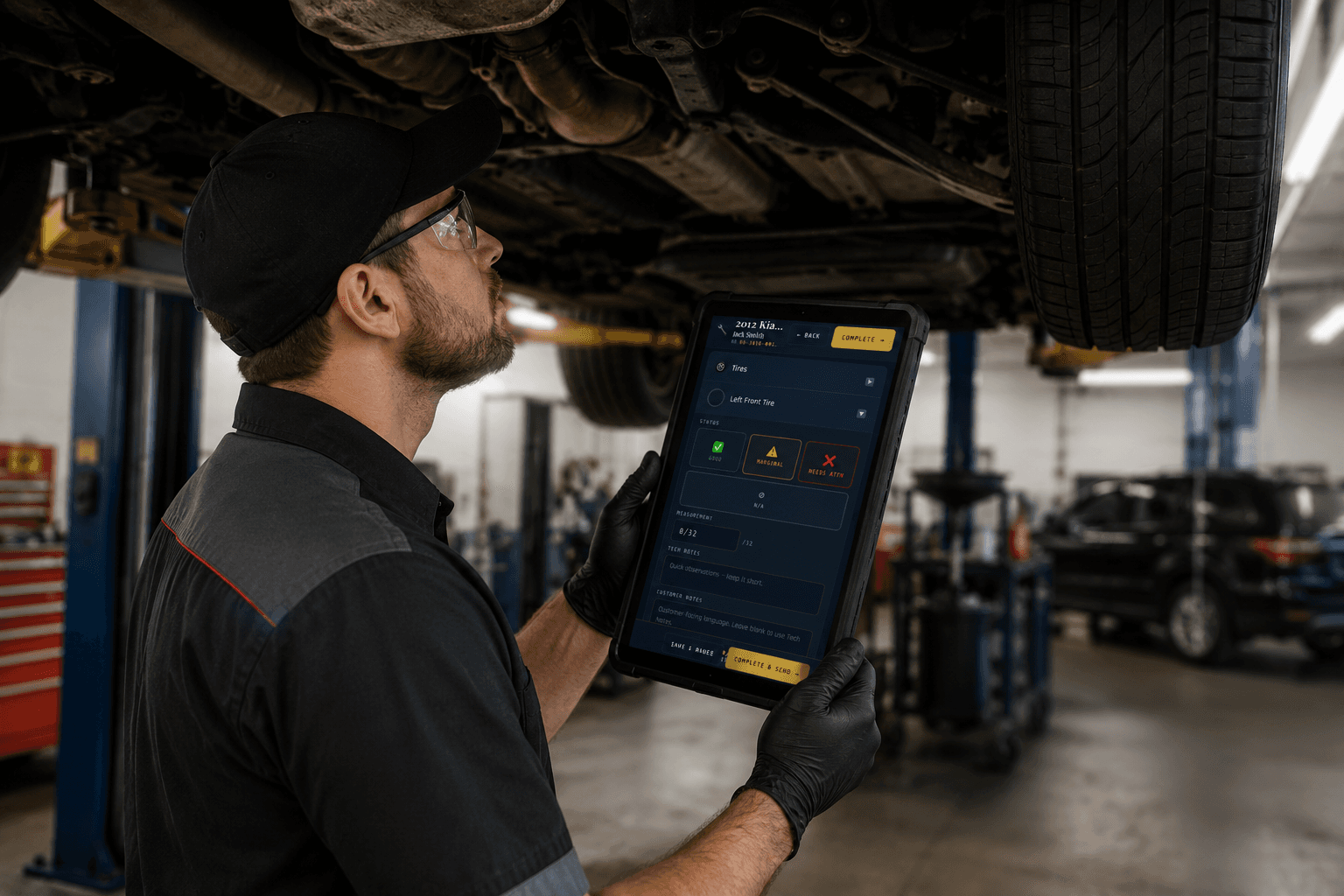
Tech Performs the Inspection
Your tech runs a full digital inspection,
documenting every finding
with photos and notes
in real time.
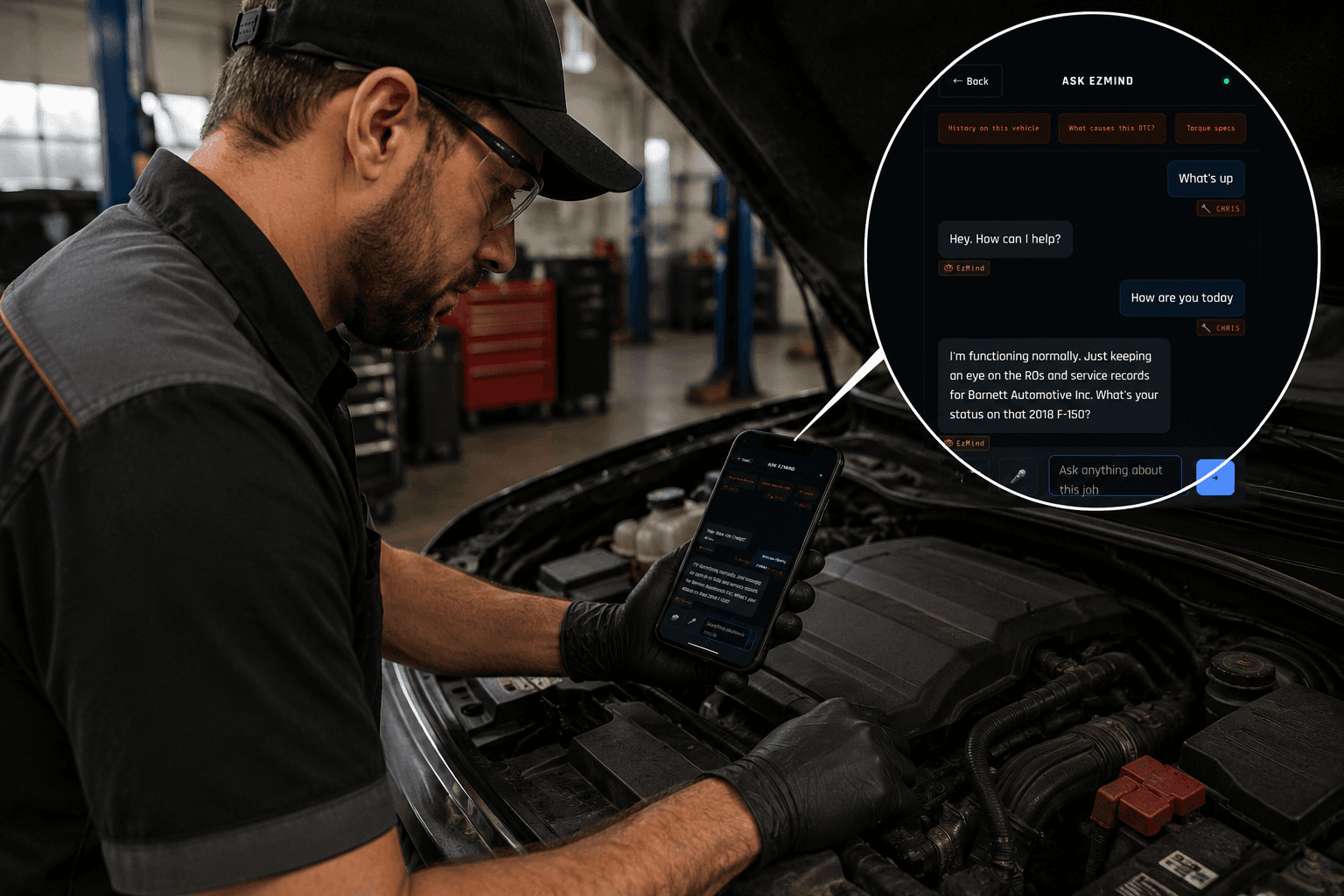
EzMind Assists Your Tech
EzMind turns your tech's
short hand notes into
AI powered rewrites
that speed up diagnosis
and improve communication.
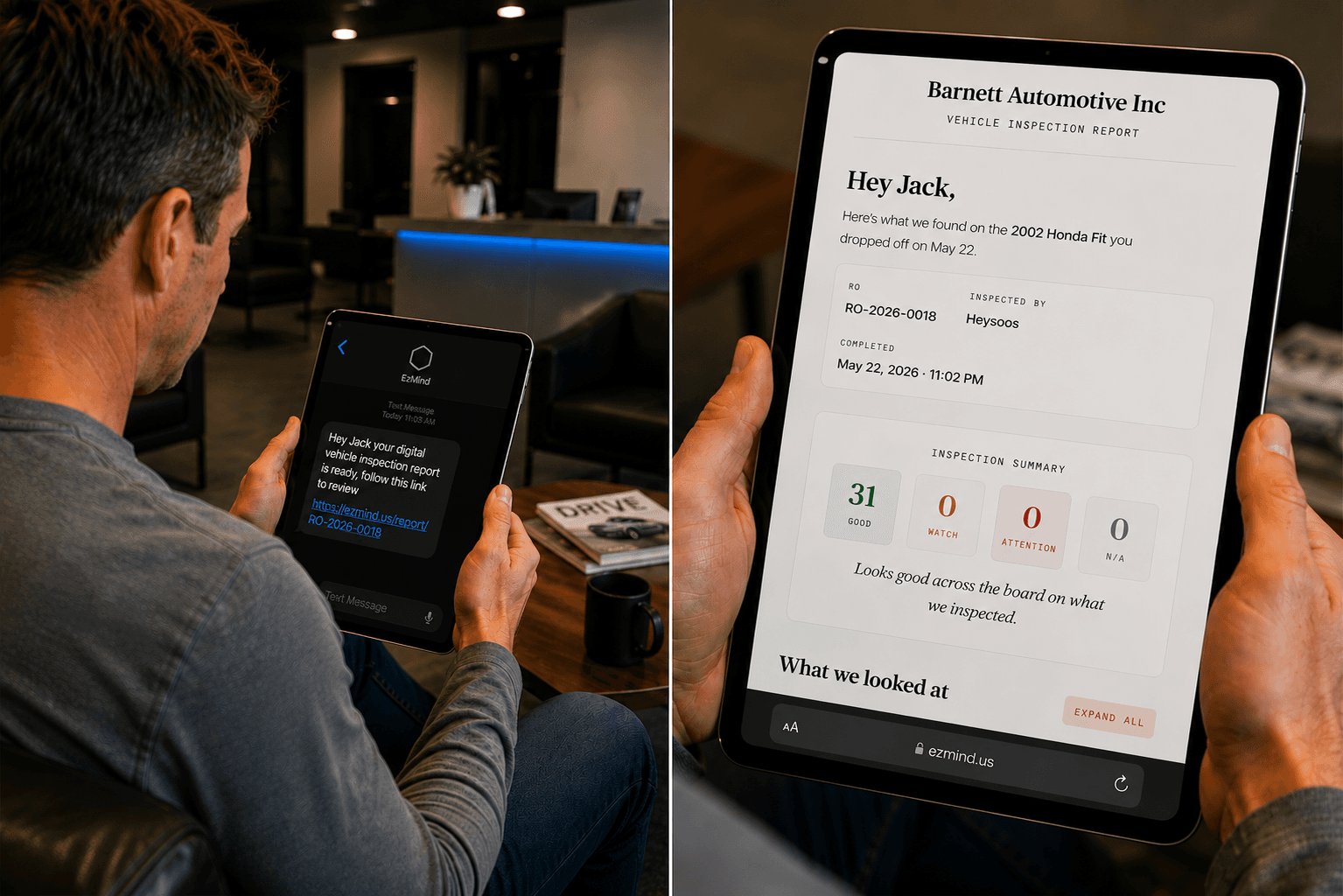
Customer Reviews the Inspection
The completed inspection goes straight
to your customer with photos
and clear explanations
that build trust.
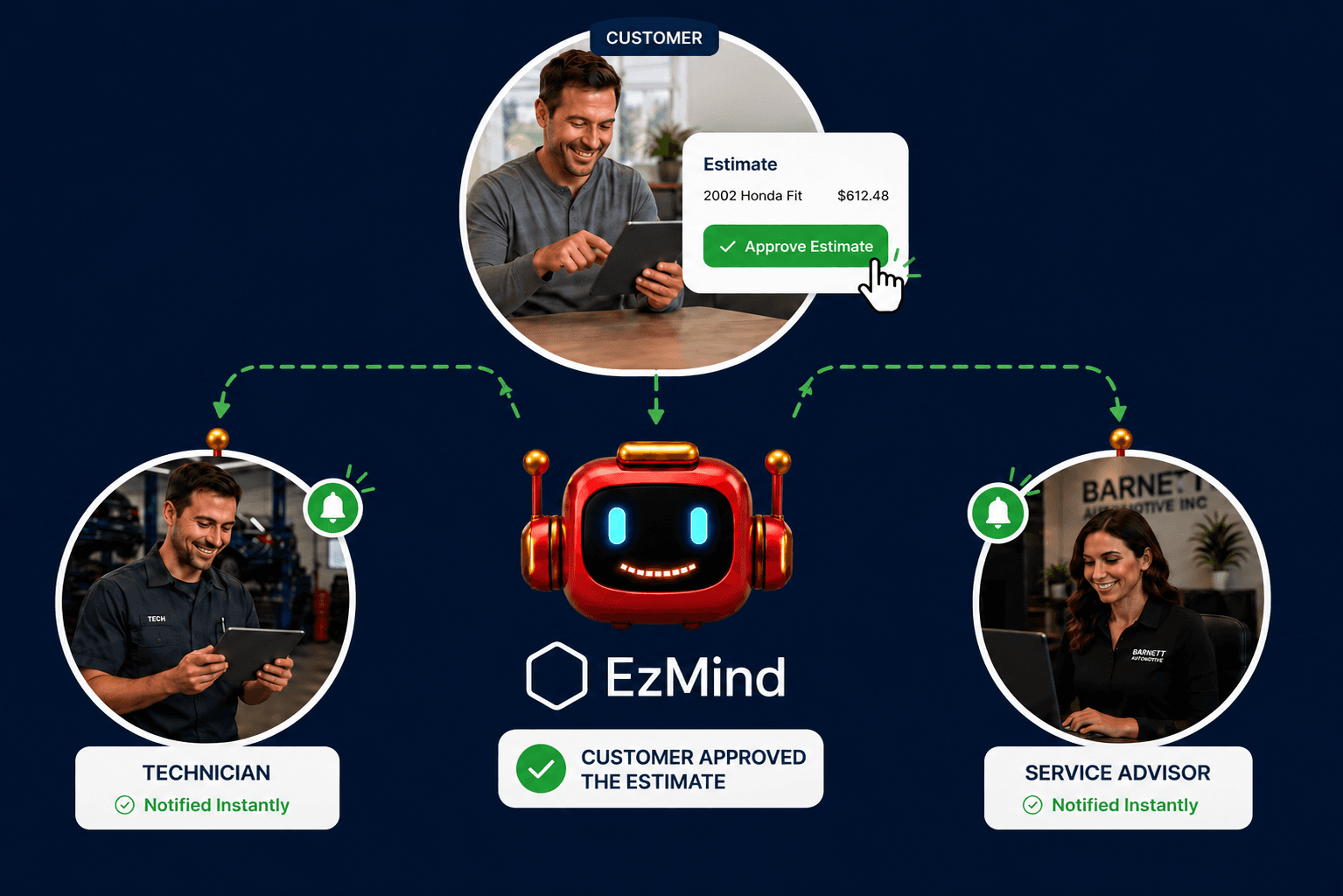
Customer Approves the Estimate
Your customer reviews
and approves the estimate
with one tap. Faster approvals mean
less time chasing authorizations
and more cars moving
through your bays.
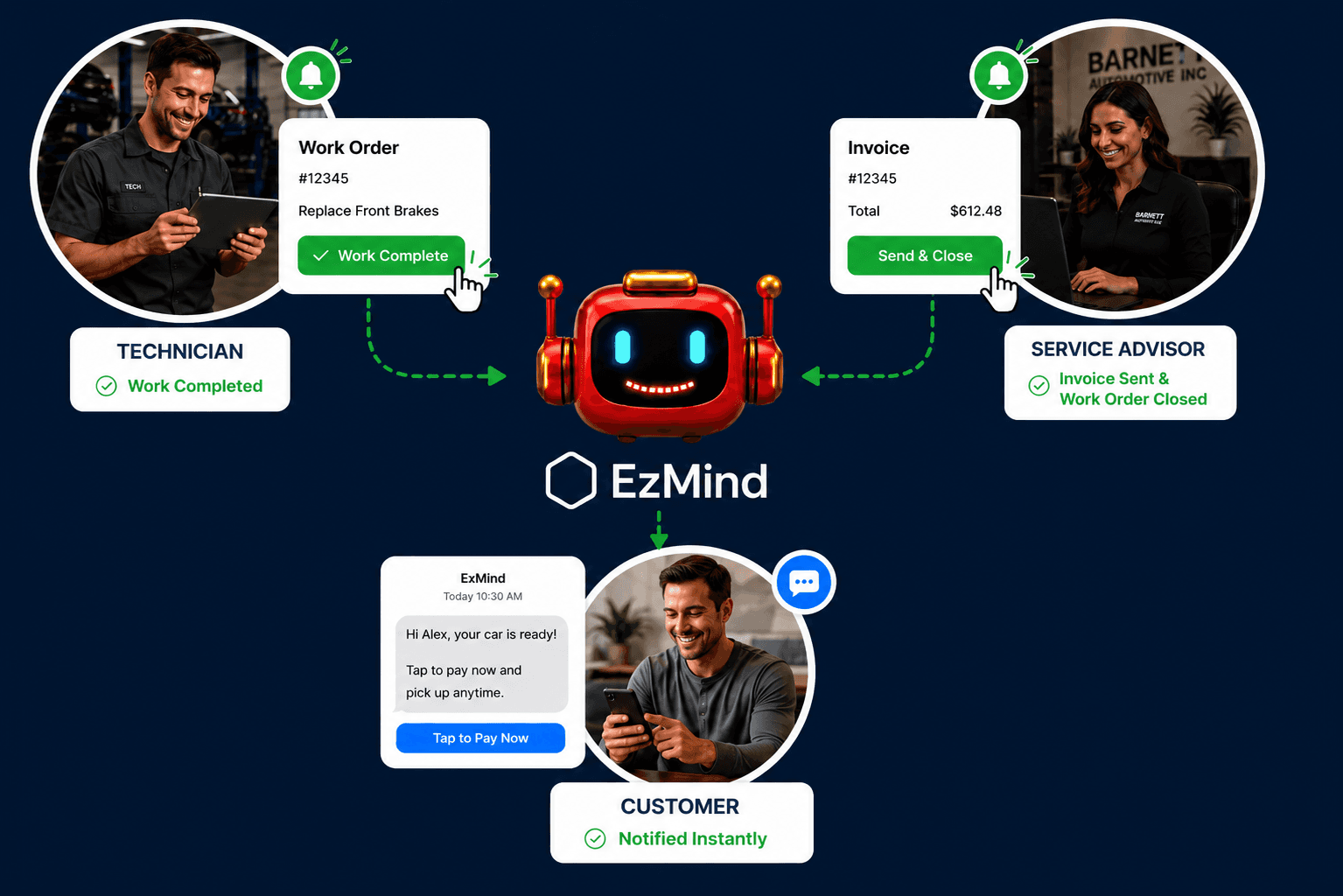
Work Complete
The work order is closed
then EzMind notifies the customer
instantly for payment and pickup.
EzMind also saves and starts
tracking all numbers
from the closed invoice.
📱 SMS Updates
Choose whether you want EzMind Inc. text messages for system updates, payment reminders, and owner support.
EzMind Shop Features
The complete capability map of EzMind running in your shop.

Portable Web App 🌐
Portable Web App 🌐
- Local browser access on existing devices: EzMind is served over local web portals. Any device on your shop network that can open a web page can access EzMind through the internet browser your team prefers.
- Private-network-only portal broadcast: EzMind web portals are broadcast only on your private local network over Wi-Fi or hard-wired ethernet connections.
- Role-based multi-portal architecture: Multiple user portals are built in, each with its own chat surface and role-aware permissions.
- Technician portal with dedicated chat: The Tech portal has its own chat surface tuned for bay work: findings, procedures, historical repairs, parts references, and in-progress job context.
- Operations portal with dedicated chat: The Operations portal is optimized for front desk workflow including check-in, scheduling, estimate flow, callbacks, and customer communication.
- Document intake portal for historical batches: A dedicated Intake portal handles historical document ingestion in batches so invoices, ROs, and legacy records can be imported in clean, structured runs.
- Shop display portal for waiting room screens: The Display portal powers waiting room screens for customer-facing updates, completion notifications, and rotating shop specials.
- PIN-gated owner's portal with SuperChat: The Owner portal provides high-permission SuperChat for financial insights, employee insights, access controls, broadcast messaging, and system-level oversight.
EzMind runs as a portable web app on your local network with dedicated portals and chat surfaces by role.
Chat-Based Operating System 💬
Chat-Based Operating System 💬
- Deterministic chat-based answers: Every factual response comes from your shop's actual database. EzMind translates your question into a real query, retrieves the data, and phrases the answer in plain English. The conversation is natural; the truth is in your records. No hallucinations, no made-up customers, no invented histories.
- Role-aware permissions: Permissions are enforced by user portal. Access is explicit, not implied, and every action is permission-checked before execution. All EzMind activities are logged at the system level. Chat logs and notification logs are available for thorough system auditing.
- Chat-driven creation, not just queries: Every core action in EzMind can be initiated through chat, with the click-based UI as the visual surface for the same operation. "New RO" and EzMind walks the user through every legally required field by conversation - name, contact, vehicle, complaint. Anyone who can read and type can do a full compliant customer write-up by following the prompts.
- One-shot natural language commands: Common operations execute in a single sentence. "Reschedule Jason's oil change for next Wednesday at 3." "Add a new customer named Maria Rodriguez at 321-555-0142." "Close out RO 2026-0042." EzMind confirms the action and executes. No form to fill, no menu to navigate.
- Guided intake by anyone: Because chat asks one relevant question at a time, the system can be operated by users with minimal training. New hires onboard themselves by following the prompts. Eventually the customer themselves can self-serve intake by tapping through the conversation on a kiosk or shared tablet.
- Click or chat - your choice: Every operation has both surfaces. Some users prefer forms and visual click-paths; others prefer to type their way through. EzMind supports both equally, and the captured data is identical either way.
- Natural-language reminders: Tell EzMind to remind you about anything in plain English. "Remind me to call home in an hour." "Remind me to follow up with Mr. Jones next Tuesday." Personal or operational, EzMind handles both through conversation.
- System-wide notification broadcast: Send a single message and every terminal in the shop sees it instantly across counter, bay, and office screens.
- Built-in help discovery: Type "help" or "what can you do" in chat and EzMind returns categorized help topics organized by capability area with examples and usage guidance.
- Multi-turn conversation context: EzMind retains the thread of your conversation within a session. Ask "Show me Mr. Jones's history," then ask "What was his last decline" - EzMind knows the context.
- Operational state queries: Ask EzMind anything about what's happening in the shop right now: what's waiting on parts, which ROs are over 48 hours old, who needs a callback, and more.
- Trend awareness on demand: EzMind notices what is changing in your shop and surfaces it conversationally when relevant, including customer return gaps and rising job categories.
- Document and inspection lookup through chat: Pull up past inspections, invoices, and findings conversationally without digging through folders or disconnected systems.
- Backup and system commands by chat: Run backup, check system status, storage remaining, and last backup timestamp using the same chat interface used for operations.
- Anti-hallucination architecture: The language model translates questions and phrases answers. Your database holds the truth, making responses trustworthy enough for real shop operations.
EzMind is chat-first. Core operational actions, queries, and notifications are handled through conversation.
Knowledge & Memory 🧠
Knowledge & Memory 🧠
- Historical document ingestion: EzMind ingests your old invoices, ROs, and customer records, automatically classifies them, and makes years of history instantly searchable.
- Customer recall: Every customer profile includes vehicles, repair history, declined work, and contact preferences for instant walk-in recognition.
- Parts and labor pattern recognition: EzMind learns real part/labor combinations your team actually uses by make and model.
- Vehicle history depth: Vehicle history spanning all visits, all technicians, and all findings is queryable in plain English by make/model or by customer.
- Declined work memory: Every declined recommendation is tracked and surfaced on the customer's next visit before a new estimate is written.
Ask EzMind anything about your shop history in plain English - no SQL and no report building.
Workflow & Operations ⚙️
Workflow & Operations ⚙️
- Digital Vehicle Inspections (DVI): Tablet inspections by category with photos, measured values, and four-state scoring: Good, Marginal, Needs Attention, or Not Applicable. Notes attach to individual items and to whole categories.
- Estimate composition: EzMind rewrites tech findings into customer-facing language automatically. "RH brake pad 2mm" becomes "Right front brake pads worn beyond safe limit."
- Phone approvals: The customer opens a link or scans a code and sees the findings, photos and each quoted repair on their own phone, then approves or declines each one. No app, no account.
- Repair order management: Open ROs, work in progress, completed, ready for pickup - every state tracked so service writers always know what is where and what is owed.
- Built-in invoicing and POS: EzMind includes native invoicing and point-of-sale workflows, so checkout, payment capture, and receipt handling happen in one system.
- Appointment scheduling: Create, view, and reschedule appointments through chat or click. One-shot updates work in plain English.
- Appointment lookup: Customer calls to check status and EzMind surfaces vehicle, work in progress, and ETA in one query.
Every operational state is queryable by chat - "what's still waiting on parts," "who needs to be called today," and "which ROs are over 48 hours old."
Intelligence & Insight 📊
Intelligence & Insight 📊
- Daily owner briefings: EzMind delivers a daily owner briefing with on-the-books schedule status (today appointments), yesterday financials (ROs closed, labor, parts, sales tax), yesterday activity (wait jobs, new customers, events), live shop health (open ROs older than 7 days with oldest age), inventory snapshot (stocked SKUs, capital tied up, retail value, potential margin, below-reorder count), and one-tap drill-down actions for Yesterday's ROs, Open > 7 Days, Low Stock, Labor vs Parts, and Week Revenue.
- Owner-exclusive charts: Visual breakdowns of revenue trends, customer concentration, technician throughput, parts profitability, and operating performance available only to owners.
- Revenue attribution: Every dollar EzMind generates is tracked across DVI-sourced work, phone-approved estimates, and declined work recovery.
- Natural language queries: No reports to build and no dashboards to configure. Ask in English and get an answer with the data behind it.
- Parts cost monitoring: EzMind monitors supplier parts costs over time to flag when prices are increasing.
Owner intelligence is conversational top to bottom. Anything you'd ask an accountant or operations manager, ask EzMind first.
Vehicle Repair Insights 🚗
Vehicle Repair Insights 🚗
- Repeat repair detection: When a vehicle returns for the same complaint within a short window, EzMind surfaces it as a comeback. Example: "This is the second time this F-150 has come back for the same misfire in 30 days." Catch warranty exposure early, identify missed root causes, and protect the shop's reputation by addressing comebacks deliberately instead of by accident.
- Common-failure patterns by make and model: EzMind learns which repairs your shop performs most often by vehicle and surfaces them as predictive intelligence. Example: "On 2015-2018 Civics, intake manifold gaskets fail between 80,000 and 100,000 miles in your repair history." Techs walk into the job knowing what's likely, service writers can recommend with confidence, and the shop builds expertise faster.
- Diagnostic pattern matching across vehicles: When a DTC code appears, EzMind surfaces every previous occurrence in your shop's history and what fixed it. Example: "This P0420 code has appeared on 14 vehicles in the last two years. The successful fix in 11 of those cases was catalytic converter replacement; the other 3 were O2 sensors." Real shop-specific diagnostic intelligence, not a generic code lookup.
Ask EzMind about any vehicle's likely failure points, any DTC code's repair history, or any comeback pattern in plain English.
Financial & Tax 💰
Financial & Tax 💰
- Sales tax tracking per invoice: Every closed RO tracks sales tax collected with running totals surfaced in the daily briefing throughout the filing period.
- Filing window prompts: When the sales tax filing window opens, EzMind prompts the owner with exact amount owed and filing deadline.
- Operating income tracking: Every dollar coming into the shop is categorized and tracked monthly across labor, parts, taxes, sublets, financing, and miscellaneous.
- Operating expense tracking: Every expense from supplier invoices, receipts, and payments is categorized monthly for real-time financial visibility.
- Photo-based expense ingestion: Snap a photo of any supplier invoice or receipt and EzMind extracts line items, amounts, and category with no manual entry.
- Tax prep handoff: Generate accountant-ready packages with categorized income, expenses, sales tax filings, and supporting documentation.
- A real profit and loss statement: Six sections: revenue, cost of goods sold, operating expenses, payroll, sales tax liability, and capital. The capital section is a balance sheet. Select and compare date ranges; figures remain read-only until the owner deliberately unlocks them for editing.
Ask EzMind anything about your shop's financial position - "how much sales tax do I owe this period" and "which months were most profitable last year."
Reminders & Follow-Ups ⏰
Reminders & Follow-Ups ⏰
- Natural language reminder creation: Tell EzMind to remind you about anything in plain English, personal or operational.
- Declined work follow-up: Every customer who declined recommended work is tracked and surfaced when they return.
- Customer return reminders: Customers who have not visited in a while are surfaced for outreach with relevant prior service context.
- Vehicle service interval tracking: Per-vehicle service intervals are tracked from manufacturer recommendations and shop history.
- Task management: Anyone can set reminders by chat, and they surface as toast notifications at the chosen time on active devices.
- Operational follow-ups: Set reminders tied to ROs, customers, or vehicles for part orders, callbacks, deferred repairs, and next actions.
Set, view, and clear reminders through chat - "what reminders do I have today," "remind me about X," and "I already called Mr. Jones."
Privacy & Ownership 🔒
Privacy & Ownership 🔒
- On-premises hardware: EzMind runs on a dedicated appliance in your shop. Customer, financial, and operational data stays in your building.
- No cloud, no SaaS: No remote servers processing your data, no third-party AI provider seeing your customers, and no SaaS lock-in.
- Customer-owned data: You own the appliance, software license, and ingested records. Your data and system remain under your control long-term.
- Internal USB backup: Nightly backups to an internal USB drive inside the appliance with optional physical rotation for off-site protection.
- On-demand backup via chat: Run manual backups anytime via chat command before updates, maintenance, or extended downtime.
- Per-shop SMS architecture: Your Twilio account, your phone numbers, your compliance, and your billing with EzMind supplying the messaging engine.
- Air-gapped operation possible: System can run fully offline if desired. Updates are optional and not required for core operation.
- Business immortality: Longer usage means more real-world patterns learned over years that never get forgotten. The system becomes a digital version of your operations that lives in a box and does not die, making turnkey transfer possible in a way it has never been before.
- Owner's vault: A PIN-protected digital vault where owners ingest founding and confidential business documents that the LLM can reason against inside SuperChat, with export and reprint access from anywhere at any time.
Ask EzMind what it knows about your shop and your data with full transparency - no hidden cloud pipelines and no telemetry going out.
Setup & Maintenance 🛠️
Setup & Maintenance 🛠️
- Complimentary install: EzMind was designed to be your standalone day-to-day operating system. We still recommend keeping technical vehicle data resources connected for diagnostic and reference coverage.
- Historic document ingestion (paid convenience): The first 250 pages or PDFs of historic document ingestion are included. After that, ingestion is billed per page or per hour. Once parsers are tuned during the included ingestion, customers can ingest documents themselves, but it can be time-consuming. This is offered as a convenience service, not a technical service. The more you ingest, the deeper EzMind understands your business.
- On-site setup: First customer installs are handled in-shop with end-to-end operation verified before handoff.
- Included front office and bay tablets: Each EzMind system includes one refurbished HP Elite Tablet for front office use and one refurbished iPad in a rugged case for shop bay use. Shops can add any number and type of additional tablets they want.
- OTA updates: New features, improvements, and refinements can deploy automatically with no manual upgrade process required.
- Technician-serviceable hardware: Field-replaceable components are designed for fast service without factory-return dependency.
- 60-day trial: First 60 days are a real trial so value can be evaluated against attribution and operational impact.
- Built by someone who has been on your side of the counter: EzMind was founded by a former mechanic turned systems engineer with a passion for cars. The workflows are not a guess at how a shop runs.
- Local support: Built in Melbourne, Florida with direct human support from a shop-owner-founded team.
Ask EzMind directly for diagnostics, status, and self-reports - "are you running normally," "how much storage do I have left," and "when was the last backup."